| SAT/DL Examples - addButton |
|
| Home | SATGUI | SATSHELL | SATFORM | SATFILTER | SATREPORT | SATMYSQL | License | Download | Examples | Contact |
Note: In the following examples doexample is the action.
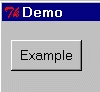
addButton {Example 1,1 8 doexample}
Note: If the state is "disabled" the button will be created as disabled by default.
In this case, using...
addButton {Example 1,1 8 doexample normal}
...or...
addButton {+Example 1,1 8 doexample}
...will create an enabled button.
addButton {Example 1,1 8 doexample disabled}
...or...
addButton {-Example 1,1 8 doexample}
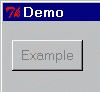
Note: To re-enable the button use setItemState.
addButton {Exit 1,1 8 exit}

Note: This button will cause the application to exit when actioned.
addButton {Example 1,1 8 doexample flat}

addButton {Example 1,1 8 doexample outline}

addButton {Example 1,1 16 doexample icon(home)}

Note: The width of icon buttons is in pixels. A width of 16 will give a square button. It is possible to increase the width, but the height will always be 16.